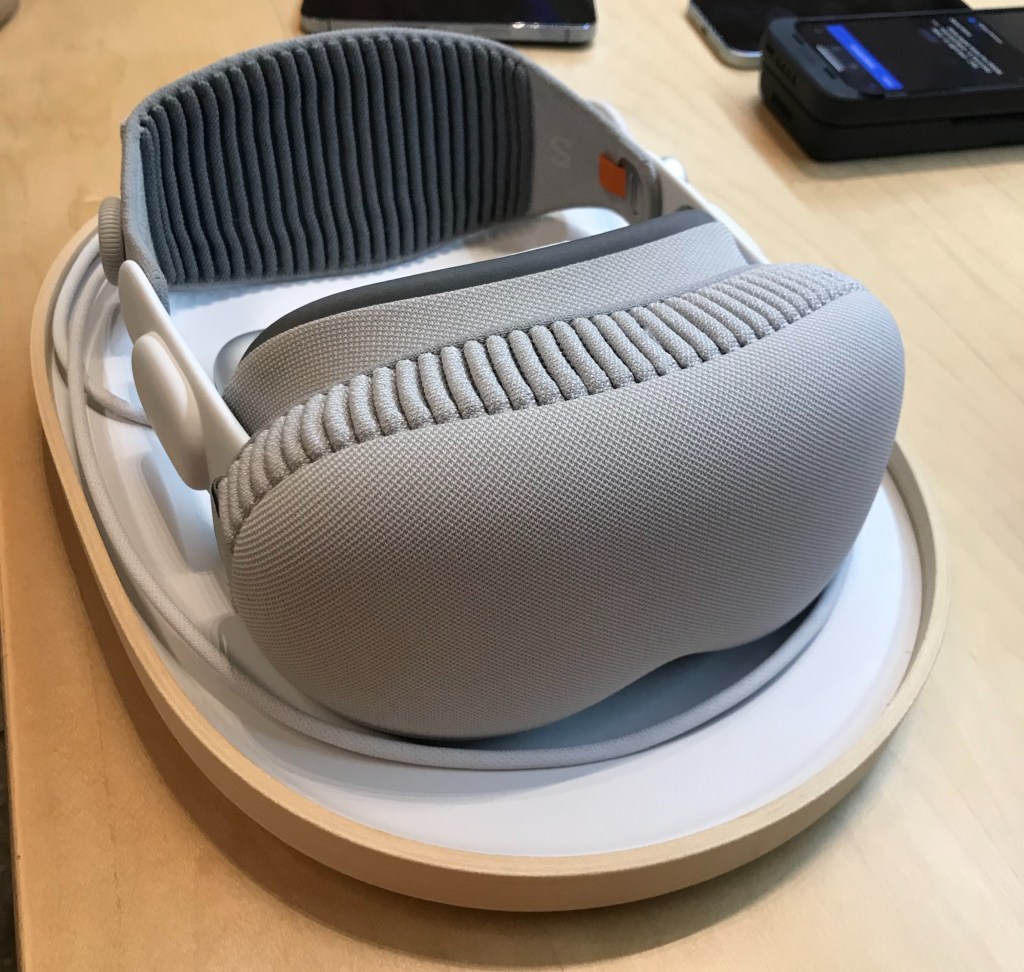
I don’t have enough money to buy the Apple Vision Pro. So I went with the next best thing: I booked a demo. While now you can sometimes book for the next day, when I scheduled it, the only times available were a week out. I didn’t have to scan my face prior to the demo, but I did have to specify if I had a prescriptive lens or not (I don’t).
I’m a VR enthusiast; I have over 50 VR games and play almost every other day. I had known that Apple had been designing a wearable HMD for a few years, and was pretty excited when they announced it at WWDC. Even though I couldn’t afford it, I still really wanted to try it. And so I did.
At the Apple Store, I checked in and waited for a few minutes. The employee I paired with, who was excellent, gave me a store phone to scan my face. (I’m size 21W. Whatever that is.) After talking for a bit with this employee, another came by with the Vision Pro literally served on a platter. The outer glass was protected with its cover, and a white pad was over the facial interface to make sure that my oils didn’t get on it. (I had been wondering how they would do this.)
When I put it on, after I adjusted the strap and the motors moved the screens together to match my IPD, world appeared as it had moments before, but in a passthrough. “Hello” was drawn in cursive, in typical Apple fashion, on top of the world.
My fit was good. Like many other people, the Vision Pro was unbalanced and uncomfortably rested too much on the bone of my nose. I had to readjust the device (which had the Solo Knit Band) midway through the session. But at least I found I could wear my KN-95 mask on alongside the Vision Pro, which is important for public health.
The employee could see what I could through an iPad mini wirelessly connected to the Vision Pro (though he had a bit of trouble at first getting them to connect), and walked me through calibration.
Calibrating was simple. A ring of eight colored dots appeared roughly halfway to the outer periphery of my vision. I looked at each dot and tapped my fingers together. This was done three times, with the passthrough behind a dark, gray, and white overlay. And that was it!
The lighting wasn’t dark—you’re in an Apple store—but the Vision Pro still struggled with the brightness in the passthrough. And there were some distortions, as though the FOV was cranked too high and the objects in the periphery had different sizes than being in the center.
For visual clarity, I very briefly tested reading text on my phone, my watch, and a hardcover book. I had no issue at the font sizes I tested. I also brought my laptop in hopes to pair it, but the Vision Pro—in demo mode—won’t let you do that. Oh well. It doesn’t seem like it can really be a “monitor replacement” though.
The demo didn’t stretch the truth—in fact, there were times where I could tell that what I was being shown wasn’t the highest quality I could experience.
Take the movie trailers: one for The Super Mario Bros. Movie, and one for Avatar: The Way of Water, viewed through the Apple TV app. The Mario trailer had compression artifacts. The Avatar trailer had a higher quality, but because it lacked HDR the whites were noticeably blown out. Those trailers were worse than seeing them in a movie theater.
The trailer for the immersive Apple TV-exclusive films was also a little odd. The cameras they used weren’t the greatest: there was chromatic aberration nearing the edges of the video. Some shots the shutter speed felt way too short, which made some scenes have unrealistically low blur. But neither of those are because of the Vision Pro.
Where the Vision Pro really shines is in the displays. My god! The micro-OLED panels are just incredibly sharp. Looking at photos in the Photos app felt like I was looking at a display with a high PPI! It was incredible. Compared to my Valve Index, where I can clearly see each and every pixel, there was just… nothing. However, the FoV on the Vision Pro is smaller than the Index, which was pretty disappointing. Not a huge deal; just don’t drive for gods sake.
The still photography was high quality, while the panorama ones oddly weren’t. The spatial videos shot on the Vision Pro where high quality, though had an interesting feeling of being a diorama, and the spatial videos shot on the iPhone 15 Pro were barely stereoscopic. (Which makes sense, because you’re trying to display images to your eyes which are inches apart, but using cameras that are only millimeters apart.)
Both Safari and Photos showed an annoying problem with the Vision Pro’s gestures: they were excessively sensitive to movement. Scrolling, panning, and zooming did not match my intentions, and I would often overshoot my target. Zooming while panning in a photo was wonky; it didn’t feel like the zoom matched what my fingers were doing! It was pretty awful.
Next I was told to enter the immersive environment. The Mount Hood one was the only one I experienced. It was, admittedly, a very well-made 360 3D video. Twisting the digital crown envelops you front-to-back, though there was a significant delay between twisting the knob and the environment changing. Where it should have precisely matched the turn, it lagged. (It is most apparent when you spin the knob really fast.)
I was already aware that the Vision Pro changed the luminance of your hands to match the virtual environment as though you were physically there. Being white, I probably had an ideal experience—my hands darkened more than a darker-skinned person would have darkened.
But I wasn’t paying much attention to that. I was enthralled by the fine masking of my hands. It was surprisingly refined, even though the store lighting wasn’t ideal. I didn’t think to push it to its limits, so I didn’t try waving my hands back and forth.
The final standout was the eye tracking. It was very precise ~98% of the time. I had some misclicks here and there, however I suspect those were because of the slight deviation between where my focus was and where my eyes actually pointed.
By then, my 30 minutes were up, I had to put the device down and walk away. I thanked the employee for their time, and reflected as I went home.
Would I use the Vision Pro in my day-to-day life? I wouldn’t watch Netflix with it (I have a TV) or YouTube (I have a computer) but I do agree with the complaints that it’s disappointing that those apps aren’t available. But I probably would use it, especially if I were to take a plane trip. Some things I could use my Mac Pro or iPhone or Apple Watch with, I could do with the Vision Pro.
But a more core problem that I have is that Apple shuns gaming. There’s no word on if OpenXR will come to the Vision Pro, which would be incredibly disappointing if it didn’t soon get it. OpenXR is the standard API now for VR. The exclusion is disappointing, and means that the gaming experience is unnecessarily limited.
Regardless, it’s a cool device. A solid 6 or 7 out of 10. Would buy if I had the money; I’m a VR enthusiast after all. But, given that people are returning it with complaints, it’s not a given I won’t return it as well.
 swinxy.me